Look at two AI fashion images side-by-side: they may look like they were made with the same tool, but one looks like a professional commercial photoshoot while the other looks noticeably fake.
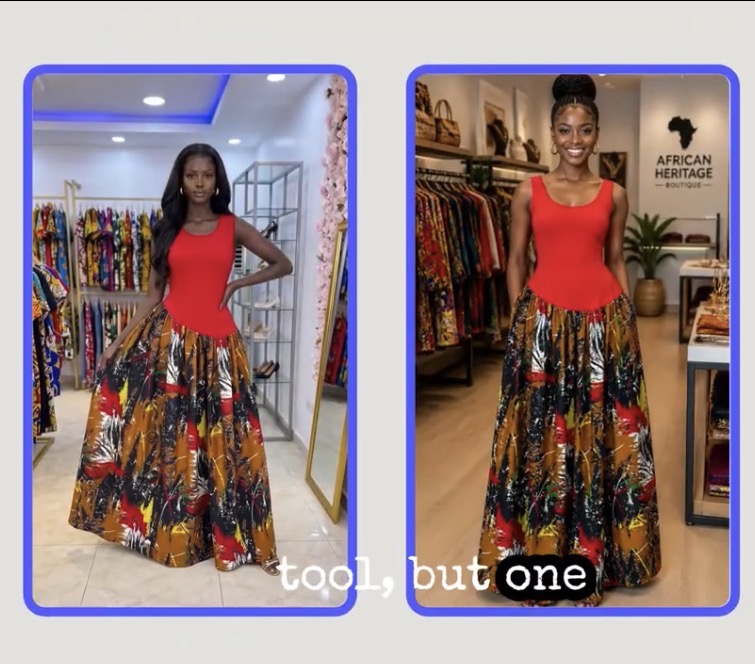
What makes the difference? Most of the time, it is not only the AI tool, it is also the prompt you give it.
When your prompt isn’t clear, the AI has to guess. It has to guess the model, the clothes, the pose, the background, the lighting, and the camera style. This guessing game creates frequent issues:
- Colors shift or change completely.
- Clothing details and fabrics distort.
- Hands and limbs look strange or unnatural.
- The final render looks nothing like the idea you had in mind.
If you want to generate high-ranking, professional AI fashion models, e-commerce product images, and AI photography for fashion brands, you need a reliable framework.
Here is the exact six-part AI prompting formula to create hyper-realistic AI fashion photos and product shots every single time.
The Rule of AI Fashion Photography: Accuracy Over Beauty
Before diving into the formula, there is one crucial rule every fashion brand, creator, and e-commerce seller must understand:
Your image should not only look beautiful, it must also show your real product correctly.
A visually stunning render is useless for your online store or catalog if the AI changes the color of your dress, alters the neckline, or removes an intricate pattern. Your ultimate goal is to generate an image that looks visually high-end and represents the real garment accurately.
The 6-Part Formula for AI Fashion & Product Photography Prompts
To eliminate AI guesswork, structure your prompts using these six core pillars: Subject, Action, Setting, Light, Camera, and Constraints.
Part 1: Subject (Who or What is in the Image?)
The Subject is the central focus of your shot. In AI fashion generation, this means the model, the product, or a combination of both (a model wearing or interacting with your item).
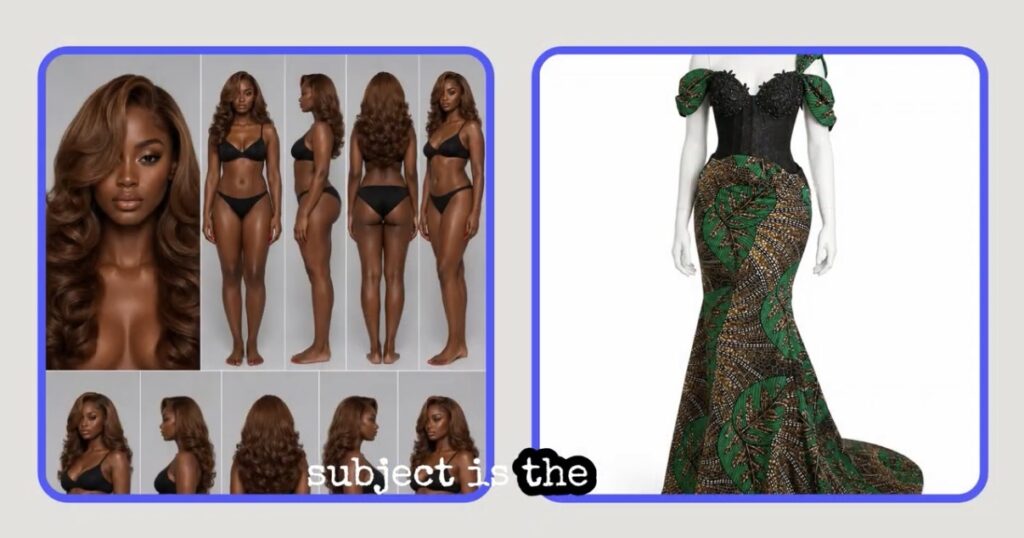
Creating Brand Consistency with AI Models
If you are generating content for an e-commerce brand or social media campaign, aim to create one consistent main model for your brand identity. Using a consistent AI model across your website photos, Instagram feed, TikTok content, ads, and lookbooks builds instant brand recognition.
Inclusivity Across Body Types
You can also establish distinct AI models for different customer personas:
- Petite models
- Tall models
- Curvy & plus-size models
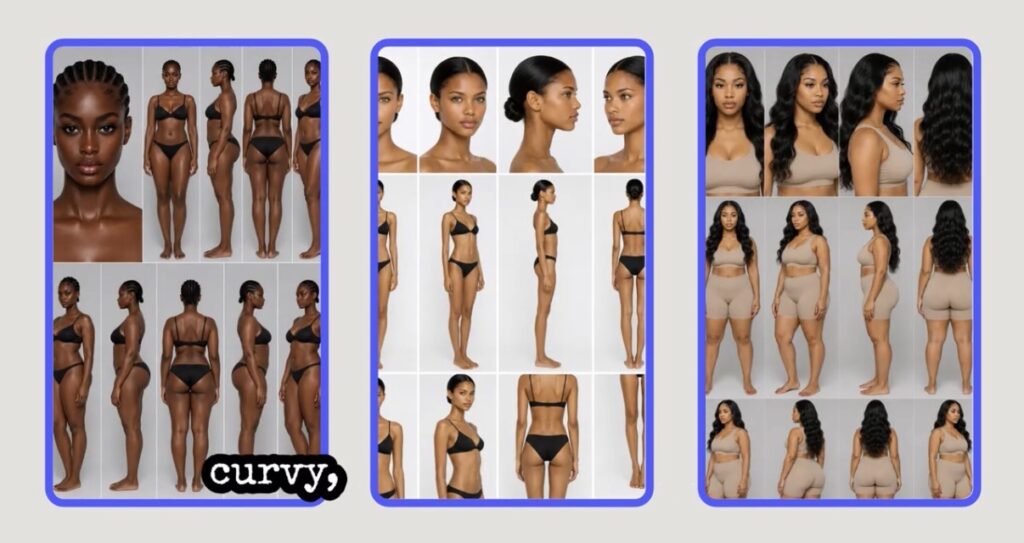
Showing the same garment across diverse body types helps online shoppers picture how the clothes will fit them, directly boosting e-commerce conversion rates.
💡 PRO TIP: Image-to-Image Workflows: If you already have a model face or product photo you love, upload it as a reference image (image-to-image prompt). Ask the AI to keep the model’s face, skin tone, hair texture, and body shape identical. This works significantly better than describing the model from scratch every time.
Product Accuracy & Styling
Upload clear, high-resolution product images (flat-lays or ghost mannequins) from multiple angles so the AI understands the true item. Use image-to-image features to dress your AI model in the exact garment.
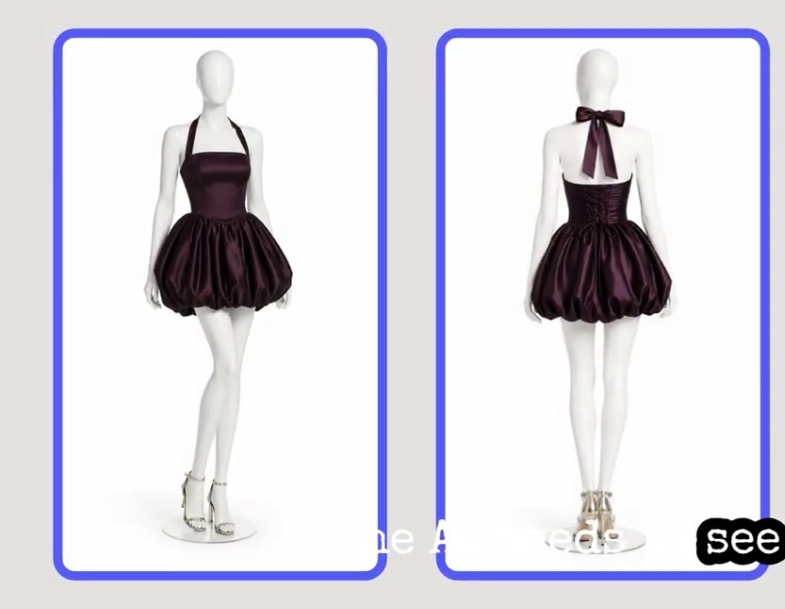
For additional styling (e.g., “Style the model with simple gold heels and small gold hoop earrings”), only let the AI generate accessories randomly if they aren’t products you sell. If those shoes or earrings are also items in your catalog, upload reference photos for them as well.
Part 2: Action (What is the Model Doing?)
The Action tells the AI how the model is positioned, moving, or expressing emotion. It includes poses, body language, and facial expressions.
Sample Poses for Fashion AI:
- “The model is standing with one hand resting gently on her hip.”
- “Captured mid-stride, walking slowly towards the camera.”
- “Standing relaxed in a three-quarter angle pose.”
Sample Expressions:
- “She has a warm, subtle, natural smile.”
- “A serene, calm, and confident editorial expression.”
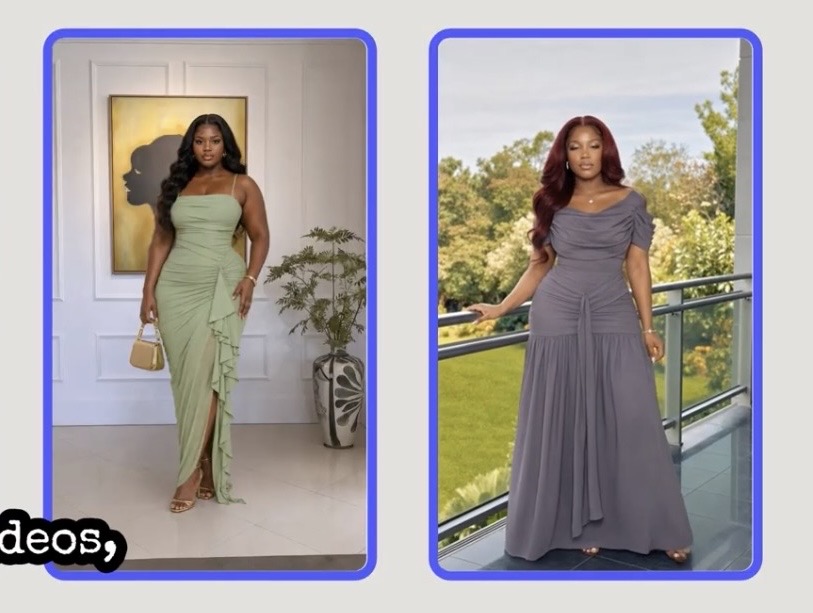
Match the Pose to the Channel:
- Website / E-Commerce Store: Use clean, simple, upright poses so shoppers can clearly inspect the garment lines.
- Social Media (Instagram / TikTok): Use relaxed, casual lifestyle poses and movement.
- Luxury Editorial Campaigns: Opt for structured poses with serious, dramatic expressions.
You can also prompt the model to interact directly with the garment to showcase fabric texture: “She is gently holding the side of the silk skirt to show the draping fabric” or “Touching the sleeve cuff of the tailored blazer.”
Part 3: Setting (Where is the Image Taking Place?)
The Setting defines the location and atmosphere. Your choice should align with your brand positioning:
| Target Channel | Recommended AI Setting / Environment |
| E-Commerce Shop | Clean studio background, seamless white or neutral backdrop. |
| Social Media | Lifestyle settings: city street, coffee shop, modern apartment. |
| Luxury Campaigns | High-end boutique hotel, architectural landmark, sleek studio. |
Example Setting Prompts:
- African Print / Cultural Brand: “Place the model inside a high-end fashion boutique that sells African print clothing, featuring neutral plaster walls, minimal luxury furniture, and warm ambient lighting.”
- Streetwear / Casual: “Place the model on a clean, quiet city street in London with modern minimalist architecture blurred in the background.”
- Studio Catalog: “Place the model in a bright photography studio with a smooth, seamless soft cream backdrop.”
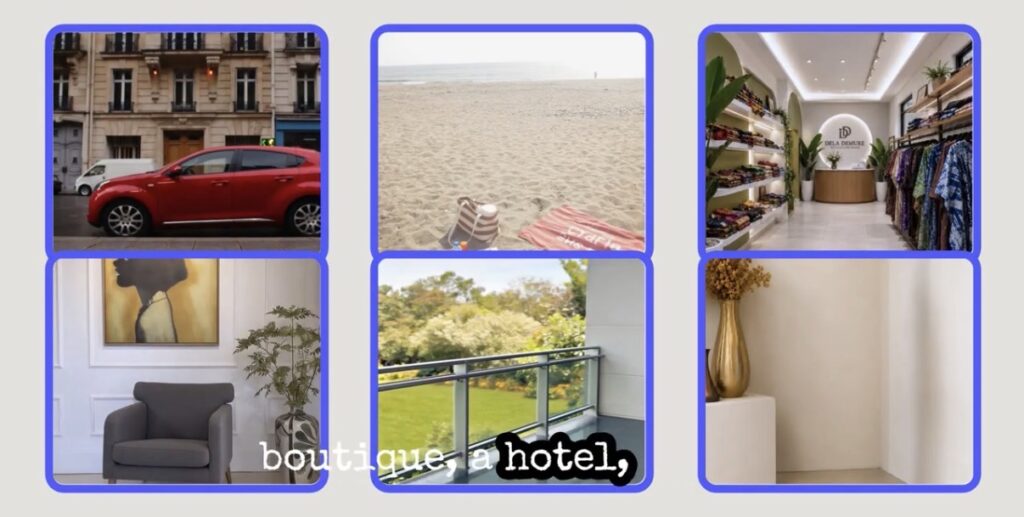
💡 PRO TIP: Consistent Backgrounds for Multi-Angle Shots
Upload a reference image of your background setting. You can then render a front view, side view, back view, close-up fabric detail shot, and short AI video snippet using the exact same environment for a cohesive, professional look.
Part 4: Light (How Should the Scene Be Lit?)
Lighting dictates the visual quality, mood, and aesthetic of your photo. The exact same outfit can look casual, editorial, or cheap depending entirely on your prompt’s lighting terms.
Popular Lighting Prompts:
- Soft & Natural (Social Media): “Soft natural window light coming from the side with gentle shadows.”
- Studio Fashion Photography (E-Commerce): “Professional fashion photography studio lighting with bright, diffused light and soft fill shadows.”
- Luxury & Sunset: “Warm golden hour sunlight with dramatic low-angle soft shadows.”
Lighting for E-Commerce Accuracy
Lighting directly impacts color fidelity:
- Warm sunset lighting can turn a crisp white dress ivory or yellow.
- Dark, high-contrast shadows can obscure fabric details on black garments.
- Color gels alter real product hues.
For product catalog shots, always prompt for balanced, neutral studio lighting to preserve true-to-life colors.
Part 5: Camera (How is the Shot Framed?)
The Camera instruction tells the AI tool how to frame the photograph, defining shot type, distance, and angle.
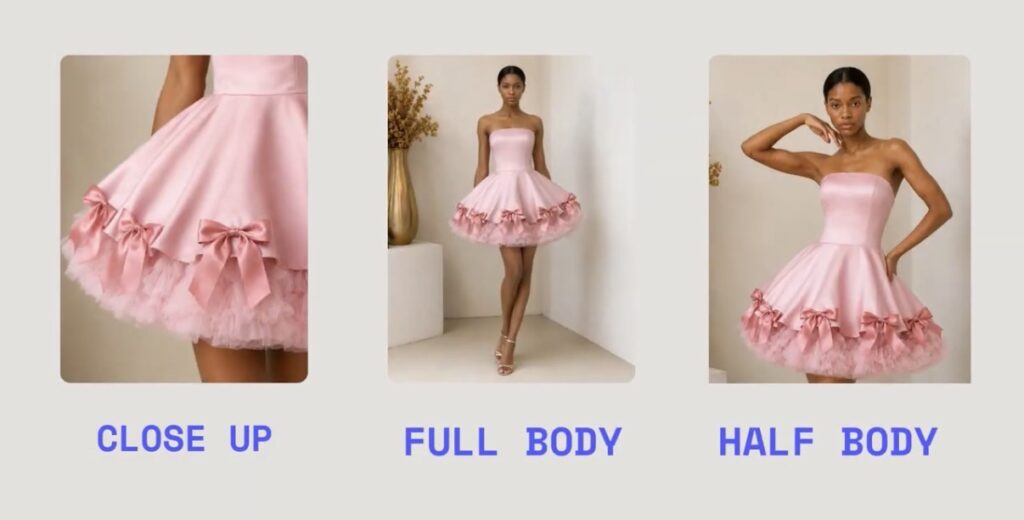
Framing & Shot Types:
- Full-Body Shot: Best for showing the complete outfit, footwear, and hemline. (“Full-body shot showing the complete outfit down to the shoes.”)
- Three-Quarter Shot: Ideal for dresses, jackets, and tops cut off around the knee or mid-thigh.
- Close-Up / Detail Shot: Focuses on necklines, fabric weaves, jewelry, or stitching.
- Eye-Level Front View: Standard straight-on camera shot for catalog clarity.
Part 6: Constraints (What Must Stay the Same?)
The Constraints section protects your product integrity. AI tools naturally lean toward creative variation. Without strict boundaries, the generator will alter your garment’s features.
Explicitly tell the AI what must remain identical:
- Garment color, pattern scale, print alignment, and fabric texture.
- Neckline style, sleeve length, waist structure, and dress length.
- Model facial features, skin tone, hair texture, and body proportions.
While constraints don’t guarantee a flawless render on the first attempt, they significantly narrow the margin for AI error.
Putting It All Together: The Complete Prompt Formula
Here is how all six elements look when assembled into a single, high-performing AI prompt:
[SUBJECT]: A full-length photo of a Black female model wearing a vibrant yellow and blue geometric African print maxi dress.
[ACTION]: She is standing in a relaxed three-quarter pose, holding the side of the skirt gently, with a calm, confident expression facing the camera.
[SETTING]: Set inside a luxury boutique hotel lobby with minimalist stone architecture and beige plaster walls.
[LIGHT]: Bright, soft studio lighting with subtle, gentle shadows that preserve true fabric colors.
[CAMERA]: Straight-on eye-level full-body shot, sharp focus on the dress fabric texture, 85mm lens style.
[CONSTRAINTS]: Preserve the exact yellow and blue print pattern, dress cut, ankle-length hemline, model face, and natural skin tone without alteration. Do not add unwanted accessories.
Compare this master prompt to a vague alternative like: “Create a beautiful model wearing an African print dress.”
With the simple prompt, the AI guesses everything; from the background and lighting to altering the dress design itself. With the 6-part formula, you maintain full creative direction.
Mastering AI fashion photography isn’t about using overly complicated technical jargon, it’s about giving the generator clear, structured instructions.
By answering six simple questions: Who is in the image? What are they doing? Where are they? How is it lit? How is it framed? What must stay accurate? You can create stunning, high-converting product imagery for your brand.